Flatfish

Attack (Tier II) Price 7000 mk Size 40*13 m Cargo capacity 8 crates Recommended crew size 5-10
Read the manuscript before using
Flatfish is a tier-2 attack submarine with limited inner space, ordinary speed and firepower. In order to make up for its very limited capacity, several automatic systems were installed, whose functions can be utilized customarily. Therefore, it is very important for users to fully understand this manuscript before set sail with this ship to minimize the chance of suffering from unwanted troubles (including the lost of crew members, in great chance).
This ship is mounted with three small hardpoints and one large hardpoint. Two discharge coils were also installed to cover the blind point of the guns. A depth charge launcher is also available on the belly of the ship. Two airlocks pointing upward and backward can be found on the front and rare of the ship. 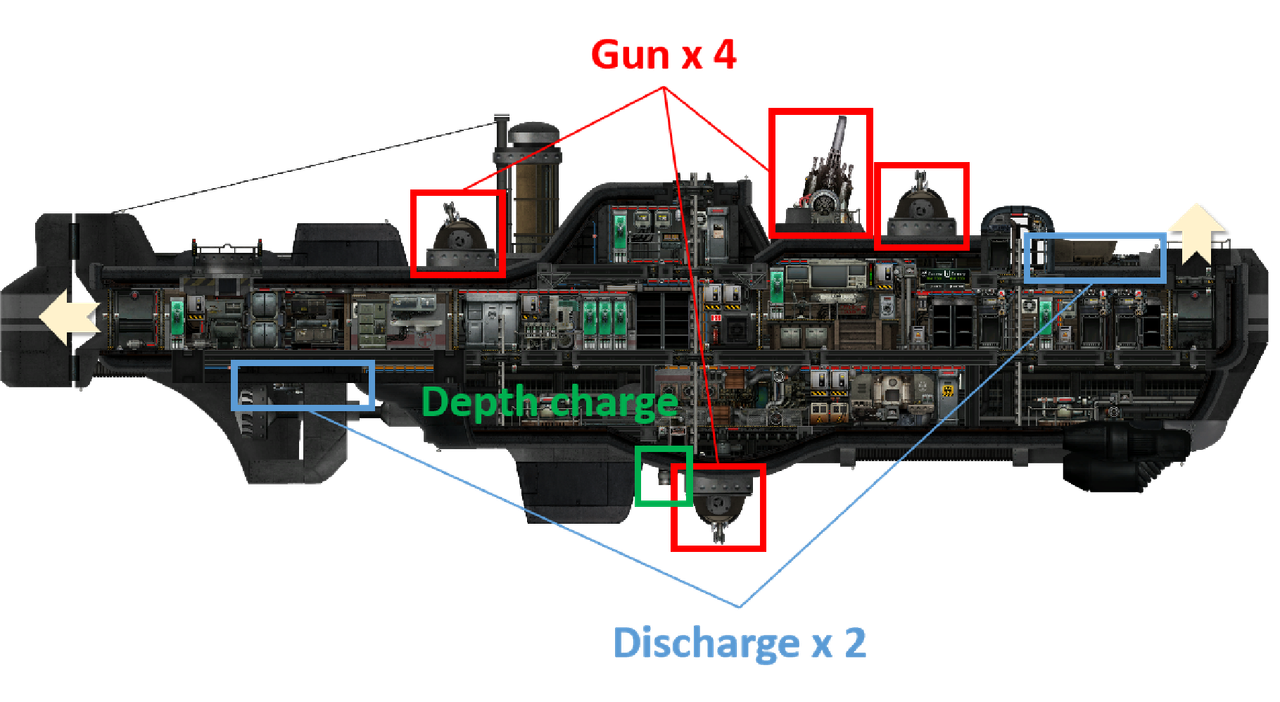
An old-fashioned ARC system was installed on this ship. You can choose to enable or disable this system by pushing the “Auto Reactor Control” button on the reactor manipulation panel (right side). ARC system requires calibration after reactor upgrades to provide most precise control. When calibration is needed, the calibration indicate light will turn yellow and the “Calibration” button on the manipulation panel can be pushed (left side). For a proper calibration, the power grid need to be stable for at least 10 sec and any fuel type higher than one uranium rod need to be loaded. 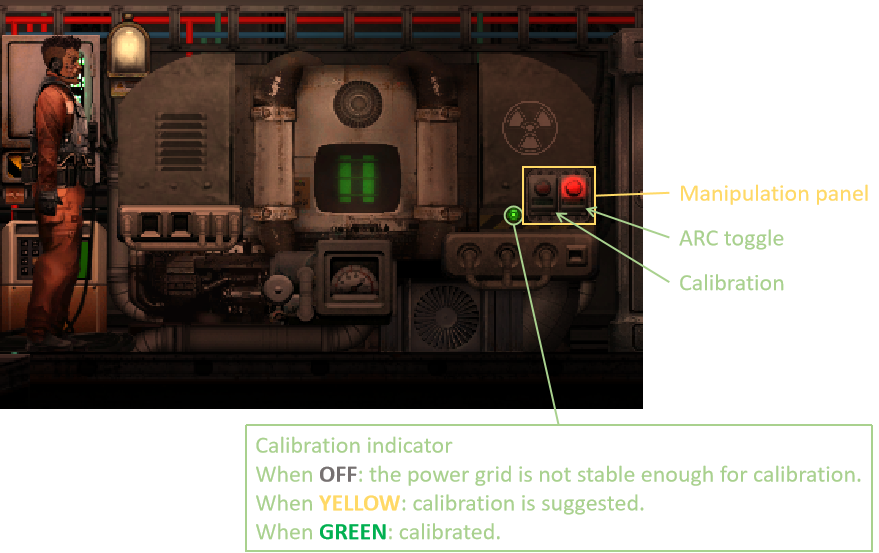
Power grid of this ship could be over-voltaged by 1.8x automatically to largely promote the function of all systems. Auto over-voltage can be activated by pushing the red button below navigation terminal, and by doing so, you will also enable ARC. “Extreme” maneuver is very dangerous when over-voltage is activated, and could cause great damage to the submarine itself. 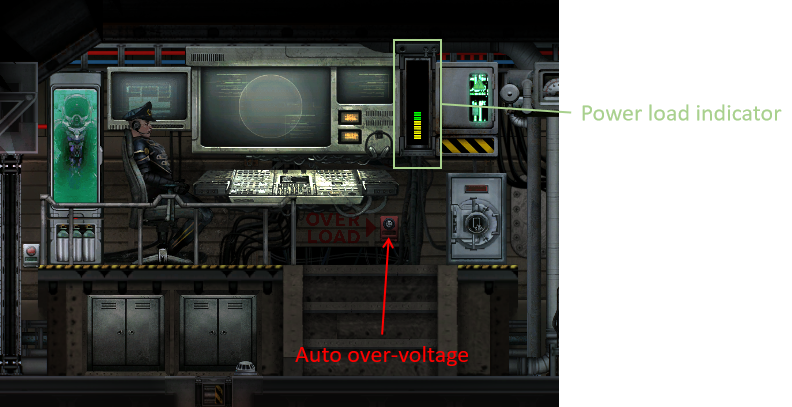
A servo drone is installed to assist diving missions. This drone have no firepower but carries a container with three slots. When docked, this container can be reached from inside the ship. Therefore it is a convenient way to transport collected/looted items back to the ship without entering through the airlock. This drone have two control modes. The first way (and also with higher priority) is to control it with a periscope on the main ship. This periscope is folded inside the shell of engineering room and could be released by pushing the “Drone control” button. In periscope control mode, the drone will move toward cursor while left mouse click is pushed. 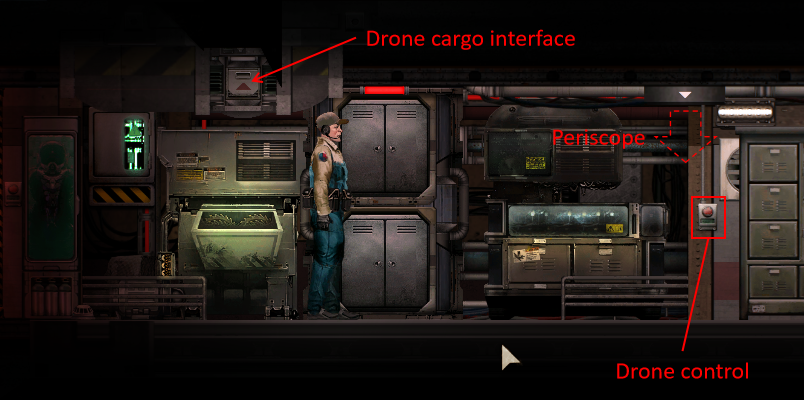 Another way to steer the drone is to active the Auto-follow mode. This enables the drone to automatically follow nearby divers without manual controls, and when multiple divers present within its detect range, the drone will attempt to stay at the “average” center of all nearby humans. Auto-follow mode could only be used when the drone is 26 meters away from the center of the main ship to avoid being interrupted by on-board crew members. A indicator light could be found on the drone to show the status of this system. When the light is off, the drone is too close to main ship thus it could only be controlled through periscope; When the light is yellow, the drone is distant enough from main ship, but controlled by a periscope thus it will not auto-follow; When the light is green, the drone is ready to enter auto-follow mode. Auto-follow mode could also be manually enabled or disabled through pushing the “Auto-follow” button on its left side (it is by default “off” after every docking), by doing so, you can order the drone to follow or to stay when necessary.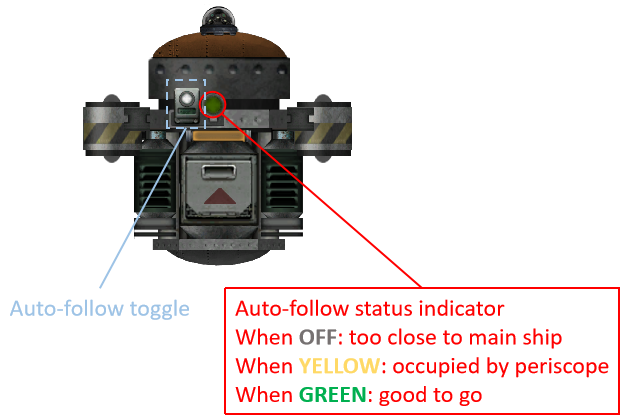
You can find the drone file at here:
https://steamcommunity.com/sharedfiles/filedetails/?id=2963190538
Find more interesting ships in my collection:
https://steamcommunity.com/profiles/76561198216900915/myworkshopfiles/?appid=602960

