Galaxy Map QoL
Avorion: 0.31 – 2.0
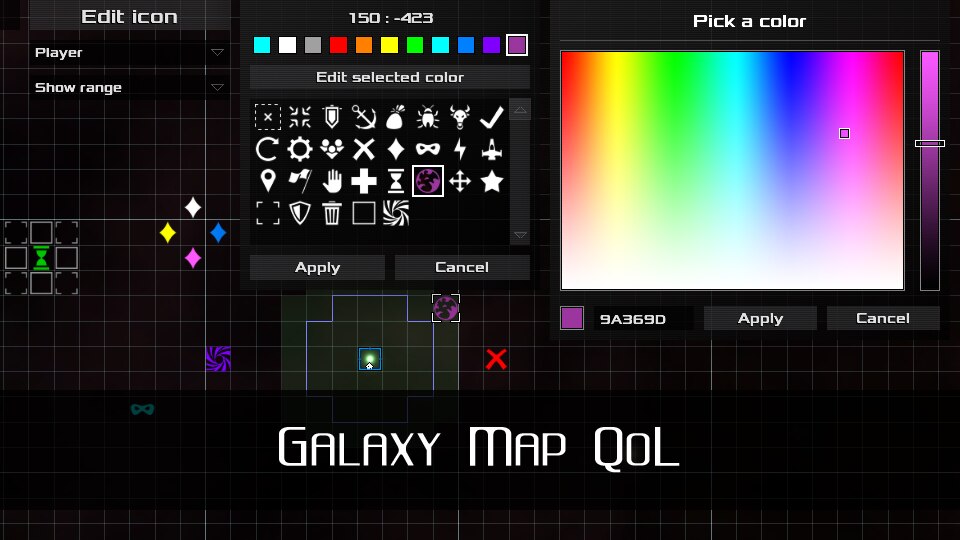
Improves Galaxy Map UI to provide more info. Allows to mark sectors with icons.
This is a client-side mod. You can install it on server for more features and to make all players automatically download it.
NOTE: This mod will be updated to the stable versions only. I’m not planning to support Beta-versions since they come out very often and I don’t have the time to check and update mods every time.
Source code[github.com] [www.patreon.com]
 [discord.gg]
- Displays distance to the center when you hover a sector.
- Adds toggleable display of resource and boss ranges.
- Allows to mark sectors with icons. If the mod is installed on a server, you will be able to add alliance icons that will be synced between alliance members.
- Displays hazard zone marks (if the mod is installed on a server)
- Adds a checkbox that locks radar blips allowing you to see them constantly and not just during the "scanning wave" animation
You can this mod in singleplayer without any additional actions.
However, if you want to use while playing on someone’s server, please ask the server owner to do one of the following things:
- Install the mod on their server (this will unlock additional features)
- OR allow players to use it:
- Create "modconfig.lua" in the server galaxy folder (Instruction[avorion.gamepedia.com])
- Add "allowed" table in the file, if it doesn’t exist:
allowed = { }
- Add "{id = "1722652757"}," and "{id = "1765619430"}," in the "allowed" table:
allowed = { {id = "SomeOtherMod"}, {id = "1722652757"}, {id = "1765619430"}, }
Follow the link[github.com].
- Tell your game version and list of mods you have activated.
- Give an instruction on how to reproduce a bug, step by step.
- Use Pastebin[pastebin.com] to attach links to your client and server logs.
Windows:C:Users(ProfileName)AppDataRoamingAvorionclientlog (datetime).txt C:Users(ProfileName)AppDataRoamingAvoriongalaxies(GalaxyName)serverlog (datetime).txtLinux:
/home/(ProfileName)/.avorion/clientlog (datetime).txt /home/(ProfileName)/.avorion/galaxies/(GalaxyName)/serverlog (datetime).txt - Make a screenshot if problem can be seen visually.
Windows – %AppData%RoamingAvoriongalaxies(GalaxyName)moddataGalaxyMapQoL.lua
Linux – /home/(ProfileName)/.avorion/galaxies/(GalaxyName)/moddata/GalaxyMapQoL.lua
Use Notepad++ for comfortable editing[notepad-plus-plus.org]
Required items:
Click the title to search on this site.
AzimuthLib - Library for modders — Steam Workshop

