PlayX

PlayX is an advanced media player that can be used to play video/music/images/websites from 16 media providers.
There is a bug in Garry’s Mod/Awesomium itself that prevents our PlayX (and not only PlayX) to open media randomly, this bug[github.com] was already reported to Facepunch[github.com] but no luck with that until now.
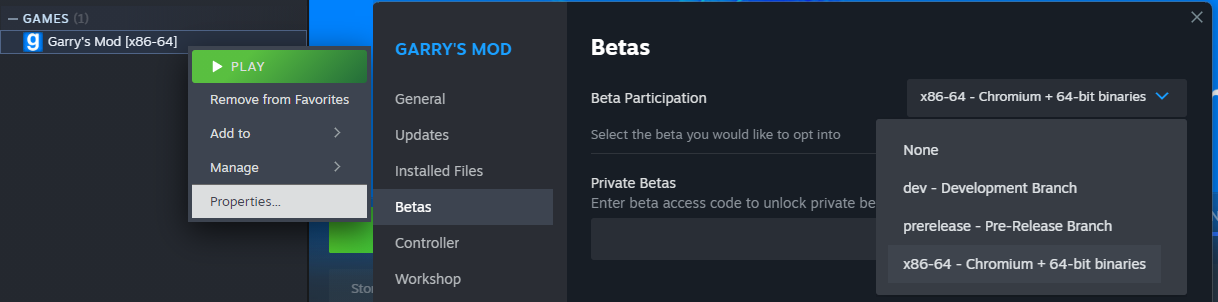
For now to this addon to work you need to use the x86-64 branch.
Some providers only work with CEF Codec fix[github.com]
Download from Github[github.com]
YouTube (live/vod) *
Vimeo *
Soundcloud *
LiveStream
Shoutcast *
Twitch.TV Streams/VODs (Mature may not work) *
FLV/MP4/AAC *
Image
MP3 *
RTMP *
Non-browsable webpage
Flash
Providers: Play videos/music/image/websites from 16 media providers.
PlayX Access: PlayX now support inheritance permissions. ULX[github.com], Evolve[github.com], Exsto[github.com] or SAM admin mod[www.gmodstore.com].
YouTube Query: Use .ytplay chat command to play a YouTube video, the top result of a query, Type: .ytplay Title of The video, example: .ytplay Gmod Idiot Box
Bookmarks: Play videos from your personal bookmark, that you can add, edit and delete URLs.
Navigator: Browse YouTube and other providers to choose easily which video you want to play.
Chat Commands: If anybody post a YouTube video URL in the chat, type: .ytplay to play that video or !playx URL to play any video supported by the providers.
* Pause support: If you want pause a video, just stay way from the player, to play just come near PlayX.
* Volume support: If you think the video volume is too high, just go on PlayX Settings on the Q-Menu -> Options and turn it down.
Full-screen: Once you spawned a Player you can enter/exit full-screen using F11 (changeable on Q-Menu->Options->PlayX->Fullscreen) or using the Context Menu. It may be pixelated
* Providers with volume change and pause support.
ONLY Post error reports on Issue Tracker[github.com].
– Servers with PlayX
– COMMON ISSUES
– GUIDES AND TUTORIALS
sk89q, X-Coder, Atomeh, Xerasin, DarthTealc, thegrb93, SwadicalRag, Linux045[github.com], Science, Adam759[github.com],
DathusBR.
CHANGELOG: Workshop or Github[github.com]
Google Drive: https://steamcommunity.com/sharedfiles/filedetails/?id=344710649
Emissive Lighting: https://steamcommunity.com/sharedfiles/filedetails/?id=2546672106
Bilibili: https://steamcommunity.com/sharedfiles/filedetails/?id=2569101717
Creative Commons Attribution-NonCommercial-ShareAlike 4.0 International[creativecommons.org]
If you want to modify PlayX you can! But only upload the modified files.
If you made some fix or improvement you can share your work here, Send a pull request on my GitHub.
1st – Don’t upload the whole PlayX folder to steam workshop, Or any other website, (if is not a fork from GitHub).
2nd – Don’t remove copyright comments and LICENSE file.
PlayX uses YouTube API to play and search videos, by using PlayX to play YouTube videos you agree with YouTube Terms and Google Privacy Policy[policies.google.com]
We don’t store, collect or sell any personal information / user information, But we use Google Analytics for anonymous statistics. We don’t share user information with any parties at all. We don’t use cookies to track user, we don’t collect any information from users’ devices. We don’t serve ads but YouTube does.
DO NOT ADD ME AT STEAM, IT WILL BE IGNORED.
DO NOT START A NEW DISCUSSION, IT WILL BE DELETED.

