ENDAIR 777-9X
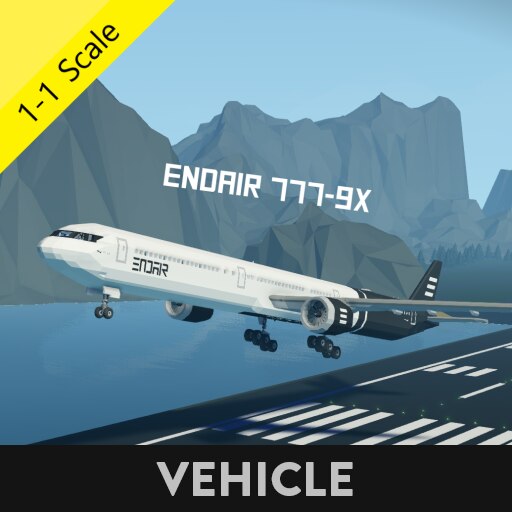
The ENDAIR 777-9X is a passenger aircraft developed by EPVIN Aviation Company
It has a Top speed of 240 Knots, Has a range of over 1000KM thanks to the new GE9X engine and 280.000L of fuel spited into 4 tanks. Also features a realistic cockpit!
The configuration is 2-4-2 in economy class, 1-1-1 in business featuring a working entertainment system and 1-1 in first class featuring both entertainment systems and Shower access
Also features a on board Bar for first and business class
and has a cargo bay And an avionics bay under the cockpit
[Requires modded workbench or custom mission to spawn]
[It is recommended to not spawn or land to very small airports]
- Digital Artificial horizon
- EICAS monitoring system [as featured in a real Boeing]
- Map
- Fuel consumption Calculator
- Radio comutication for both pilots
- Autopilot, Altitude hold, Roll stabilisation
- a blackbox and flight tracking channel with frequency set to 19
- extendable-retractable Flaps
- extendable-retractable Landing gear
- Take-Give control to Captain or First Officer
- MCAS Safety System [as featured in a real Boeing]
- Evacuation mode
- Fire supression safety systems
- 3 hydraulic systems
- Cabin light and heating controls
- Nav, Strobe, Landing, Taxi and beacon lights
- Seatbelt and No Smoking Panel and warning
How to use the PFD screen:
there is a 1×1 on the center console that has 3 options
1. NAV = Which has the Map and gps
2. EICAS = Which has the engine status as well as the Gear and Wingtips indications
3. INF = Which has a diagram of the aircraft indicating locked or unlocked exits-doors
You can select either one by pressing them on the screen!If you are getting a master warning check:
- If you have extended your WingTips
- If you have a fire Warning
- If you have a failure message in your PFD
Entertainment systems:
- You have to seat down and then look to your left (or right) for a small 1×1 screen, You can select the mode you want by pressing any of the options
HOW TO GET IN:
- You can use the "Home" button on your keyboard and No-Clip your self in
OR
- Go to any of the front doors then press the button below the small window
and then jump and grab the handle next to the door button and bring your self upSTARTUP PROCEDURE:1. Open Battery and avionics
2. Open All 3 PFD Controllers
3. Open all Hydraulic systems
4. Open EN1 and EN2 Fuel cutoff and pumps
5. Open EN1 and EN2 GEN and BUS
6. Open EN1 and EN2 Starters
7. Monitor EICAS Screen until engines are stabilized
8. Open Beacon
9. Extent Wingtips [before takeoff]APU STARTUP PROCEDURE:1. Open APU Hydraulic pumps
2. Open APU Auto-StarterAUTOPILOT SETUP:Tip Take a moment before takeoff to input your desired coordinates and Altitude to the aircraft!
1. Set up your waypoint coordinates on the Autopilot Coordinates Panel
2. Press the Engage Autopilot Button
3. Enable FDALTITUDE SETUP:1. Set up your desired Altitude on the Altitude Hold Panel
2. Press the ALT HOLD Button
3. Enable FDBLACKBOX AND FLIGHT TRACKING:On channel: 19 there is a composite signal transmition that holds flight information
THROTTLE:* 130% Takeoff
* 120-100% Cruise [Its most eficient at 120%]
* 50% Landing
* 11-12% TaxiingDisclaimer
This is a pretty hefty aircraft so it might slow down the gameCREDITSBilly-blij-1-2-3: Has offered great help with the New ALT HOLD AP Microcontroler!
3d MAP by Buunuu
CONSUMPTION 1×1 By krimwand
4 dials 1 display by michubushimax9
GPS NAVIGATION GD By MrNJersey
Advanced PFD by Ping|ArchimaedeConsider leaving a Rating and a Comment if you like the creation.
If you find any Bugs please report them down below

