Eggon’s Hotkeys & Hot Actions
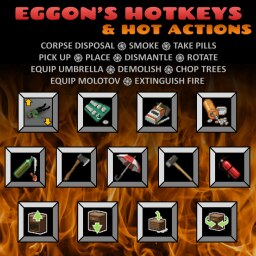
This mod introduces hotkeys for chosen actions requiring excessive clicking. No more of that frustration! All bindings can be changed/set in the game’s key bindings menu. Many actions are also accessible via ⚡ Hot Actions and ⚡ FlexKey!
⚡ Hot Actions allow you to trigger chosen actions from the context menu instead of a hotkey, because you know – keyboards have only so many keys… 😉
⚡ FlexKey – is a keybindig to which you can assign (also from context menu) action that you need at the moment. Chopping trees? Assign Chop trees. Opening storage units? Assign Sledgehammer. Cleaning the mayhem around your base? Assign Corpse Disposal. This way you can have the relevant option important for what you are doing at the moment and use just one key for many things!
If you don’t want HotActions and FlexKey to appear in your context menu, you can switch them off using ModOptions mod.
-
Corpse Disposal
4-in-1 hotkey: If no corpse in inventory picks up a corpse. If corpse already in inventory looks for a large trash container and disposes the corpse there (container icon must appear in the loot window). If no trash container is available looks for a grave and buries the corpse (you need to stand on the grave). If you are using Just Throw Them Out The Window attempts to throw out the window or over fence. If none of the above are available just drops the corpse.
Default binding: none -
Smoke
Finds cigarettes and light, unpacks them, smokes and then repacks items.
Default binding: [K] (for smoKe) -
Take Beta blockers
Finds pills, takes one and repacks the rest.
Default binding: [‘] -
Take Pain killers
Finds pills, takes one and repacks the rest.
Default binding: [] -
Equip Molotov
Finds molotov coctail and a lighter (from any container in inventory) and equips them. The lighter will be switched off, so it will not get used up while holding!
Default binding: none -
Pick up furniture
Displays pick up cursor for furniture.
Default binding: [ARROW UP] -
Place furniture
Displays place cursor for furniture.
Default binding: [ARROW DOWN] -
Dismantle furniture
Displays dismantle cursor for furniture.
Default binding: [DELETE] -
Rotate furniture
Rotates currently held furniture.
Default binding: [ARROW RIGHT] -
Chop trees (& equip axe)
Equips axe (if not equipped) and displays chop trees cursor. Looks for the biggest axes first.
Default binding: none -
Demolish (& equip sledgehammer)
Equips sledgehammer (if not equipped) and displays demolishion cursor.
Default binding: none -
Umbrella
Finds and equips opened umbrella as secondary item. If umbrella is equipped, closes it, repacks and equips previously held item. Repack and reequip will not trigger if game was reloaded while umbrella was held.
Default binding: none
-
Extinguish fire
Finds extinguishing item, unpacks it to main inventory and triggers extinguishing cursor. Items will be sought in the following order: 1) Extinguisher, 2) Sandbag, 3) Gravel Bag, 4) Dirt Bag, 5) Water container.
Default binding: none -
Sit on the ground
Sit on the ground.
Default binding: none -
Inventory related hotkeys
10 additional hotkeys related to invenory (open backpack, primary, secondary, main, fanny pack, toogle inventory, loop through containers etc.) are available through Inventory Suite plugin.
Corpse Disposal action is compatible with:
1) Just Throw Them Out The Window – throw out the window / over fence action is integrated in the Corpse Disposal to be performed if possible.
Smoking action is compatible with:
1) Smoker mod – single cigs and open packs
2) Cigarettes Carton MOD – unpacked cigarettes
3) Green Fire – unpacked cigarettes
Thanks to @ThereforeAliens for the know-how on key-bindings.
Thanks to @NoctisFalco for help on smoking.
Thanks to co’ for adjusting the Just Throw Them Out The Window mod in a way allowing integration.
If you appreciate my content and want to encourage me to deliver more… consider supporting me on Ko-Fi or Patreon! Also check out my other mods! 🙂
 [ko-fi.com]
 [www.patreon.com]

Workshop ID: 2289454303
Mod ID: eggonsHotkeys

