Kaedrin’s Mod Manager v1.9.0
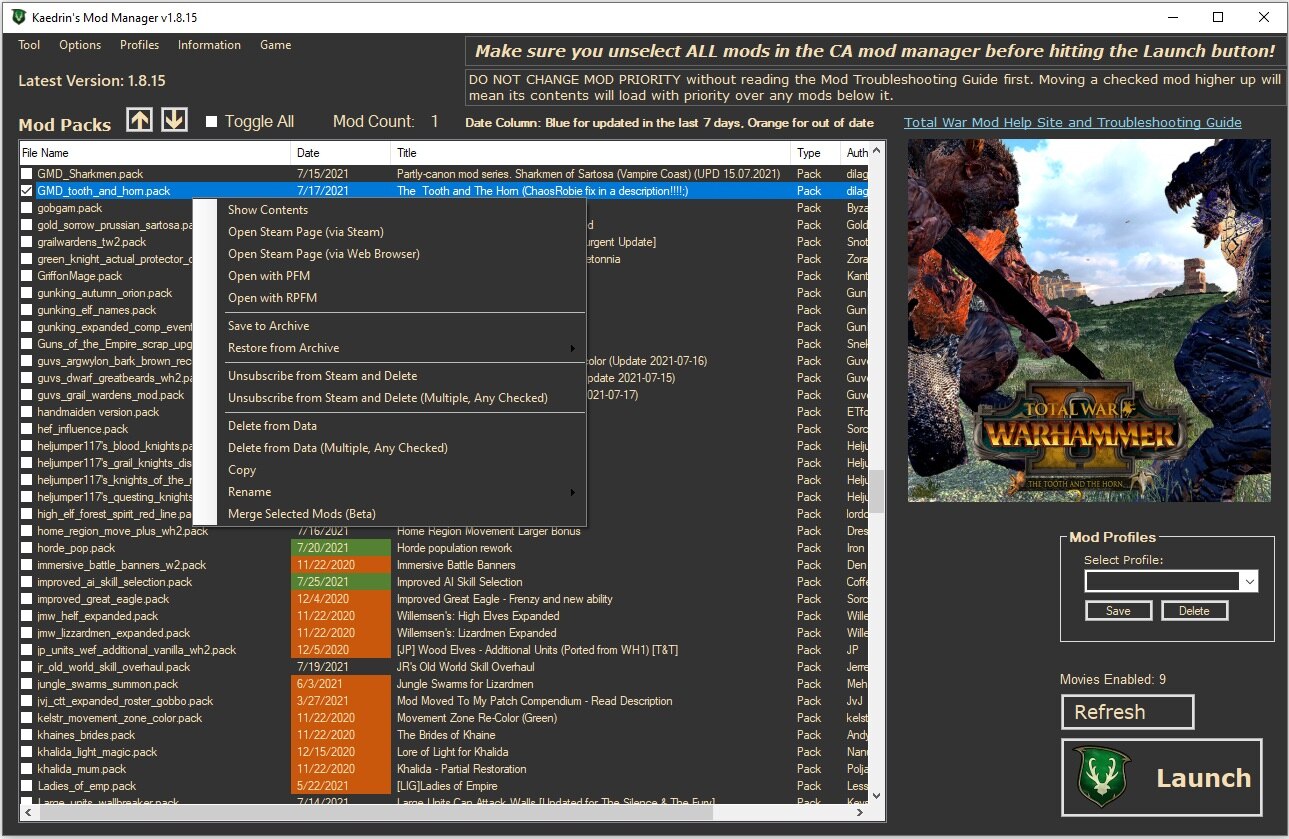
I’ve released the v1.8.15 update for the Warhammer 2 mod manager which can be downloaded here:
https://github.com/Kaedrin/warhammer-mod-manager/releases/latest
A copy can also be found in your steamappsworkshopcontent5945701399787504 folder due to subscribing to this workshop item. DO NOT ENABLE THIS MOD FOR THE GAME!
INSTALL INSTRUCTIONS:
1) Download from: https://github.com/Kaedrin/warhammer-mod-manager/releases/latest
2) Unzip the folder in your Documents directory OR your Desktop. ANYWHERE except the game directories/anything related to Steam.
3) Create a shortcut to Warhammer2MM.exe and put it on your Desktop
4) If you need to set the shortcut to admin mode, right click the shortcut, go to properties, click Advanced, and turn on "Run as Administrator"
Changes and Bug Fixes:
v1.8.15 is a major update with a raft of changes, more to come:
1. Out of date check for Warhammer 2 updated for the Silence and the Fury DLC
2. New option to force trigger downloads when a date discrepancy is detected between the Steam API and Content folder timestamps (Options -> Check Steam for Out of Date Mods). A message will pop up indicating if any are found letting you know that you need to refresh KMM after they are done downloading (check Steam and wait until they are finished downloading before clicking Refresh)
3. New Option to delete Content files for out of date check (to ensure maximum ability to get the latest, not relying on steam to replace out of date mods with the download but deleting the Content version then letting the download get a fresh copy)
4. Troubleshooting Guide URL updated
5. Profiles menu now has a new option for "Export Current Profile to Clipboard"
6. Profiles menu now has a new option for "Export Current Profile to HTML" which includes URLs to their steam page(s)
7. Profiles menu now has a new option for "Export All Mods to HTML" which includes URLs to their steam page(s)
8. Dark mode options has been added. Changing to dark mode will require a restart of KMM (as will changing back).
9. Delete from data now correctly whacks the PNG file in all cases
10. A warning is now given when a Webp malformed image is detected. .WEBP images renamed as .PNG do not work with KMM and .Net programs
11. Message informs the user when user preferences are reset due to new options being added. Next version will load from old preferences, sorry.
12. New Right Click option "Delete from Data (Multiple, Any Checked)"
13. New Right Click option "Unsubscribe from Steam and Delete (Multiple, Any Checked)"
14. Right Click option "Unsubscribe (Steam) and Delete" renamed "Unsubscribe from Steam and Delete"
15. RPFM specific files "extra_packfile.rpfm_reserved", "settings.rpfm_reserved" and "notes.rpfm_reserved" are now excluded from conflict checks
16. Open Data folder option
17. Open Content folder option
18. Clean Data and Exit
More detailed changelog is available on Github here: https://github.com/Kaedrin/warhammer-mod-manager/blob/master/README.md
NOTE: If you get the ordinal error, turn off the NVidia Overlay as that isn’t an issue directly with the mod manager. [/b]
The Merge Mod capability is used in the following way:
1. All mods that you have checked will be merged together.
2. The mod you right click to choose the option for will be the one that is chosen for creating a new file with _merge appended at the end. For example, right clicking on "test.pack" will merge all the checked mods in the grid into a single pack named "test_merge.pack"
3. Picking the same pack again for the option will currently overwrite the file without warning.
4. Conflicts are NOT HANDLED AT THIS TIME! Merge modules with conflicts at your own risk of crashing. You have been warned.
Known Issue – Napoleon will not work at this time as it doesn’t not support the new Content folder scheme and I need to set the manager up to support it strictly from Data.
WARNING If you see the CA launcher download any files, once it is finished downloading you need to click the refresh button in the KMM in order for the KMM to move those new and/ or updated mods to the data folder.The refresh button will scan the content folder again and display any newly subscribed mods in the list as usual.
Quick recap of how to use v1.8.15:
1) Disable all mods using the CA Launcher
2) Enable the mods you want using my mod manager
3) Click the Launch button and enjoy.
You can leave my mod manager up and running while you play and while you use the CA mod manager in order to download update mod files. The refresh button will reload the GUI and pick up any new(or deleted) mods.
The profiles will allow you to switch between multiple sets of mod files quickly and easily in case you prefer to have a set of creature files only enable when playing a certain race, etc.
Enjoy!
If you do happen to encounter any bugs, let me know here or email me at kaedrin.nwn2 @gmail.com Thanks and have fun!
Quick Information for how to "Reset" the manager in case it can’t find your game, such as when you move the game using steam (between hard drives).
1. In File Explorer, type %appdata%
2. Go to the "Kaedrin Mod Manager" folder
3. Delete the "GameDataV2.xml" file
4. Delete the "mod_manager_settings_v3.xml" file
Start the manager and it will detect the paths. You can also have the manager do this from the GUI by using the Options – Detect Game Installations option
Revert to Vanilla has been renamed to "Reset Program Settings" under the File Menu but it will not remove the mods from your Data folder (it only resets your manager settings). Only the "Clean Data" option under the File menu will do that.
Revisions:
Old revisions of this mod are available below. Click the link to download.

