SHELTER 25 33

A spacious bunker hidden in the countryside.
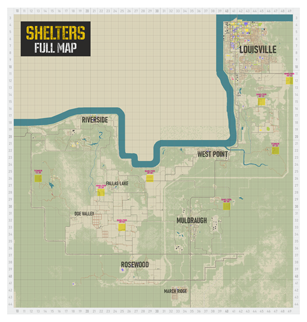
Located between Rosewood and Falls Lake.
Based on a recreated vanilla map, replaces cell 25 33.
Does not change other objects in this cell!
It contains a version with and without furniture. Use only the right one!
Просторный бункер спрятанный в сельской местности.
Расположен между Роузвудом и Falls Lake.
Основано на воссозданной ванильной карте, заменяет ячейку 25 33.
Не изменяет другие объекты в этой ячейке!
Содержит версию с мебелью и без мебели. Используйте только нужную!


Changes in update 0.5:
– New texture of the embankment in the form of a metal mesh and grass on it.
– Small fixes.
– The number of weapon boxes has been reduced.
– Added a version without furniture
Изменения в обновлении 0.5:
– Новая текстура насыпи в виде металлической сетки и травы на ней.
– Небольшие фиксы.
– Уменьшено количество оружейных ящиков.
– Добавлена версия без мебели
Yes it does, be sure to check the list of mods and maps, as well as their priority in the server settings.
Да поддерживает, обязательно проверьте список модов и карт, а также их приоритет в настройках сервера.
The SHELTERS 0.4 mod is no longer supported, unsubscribe from it if you want to start a new game and subscribe to this and others from the SHELTERS 0.5 collection
You can continue your current save with version 0.4, it will not be deleted any time soon. Do not use 2 versions at the same time!
Мод SHELTERS 0.4 больше не поддерживается, отпишитесь от него если хотите начать новую игру и подпишитесь на этот и другие из коллекции SHELTERS 0.5
Вы можите продолжить своё текущее сохранение с версией 0.4, она не будет удаляться ближайшее время. Не используйте 2 версии одновременно!
1. In the main menu, click "Load", select your save and click "More"
2. Click "Choose Mods" and select the SHELTER 25 33 mod
3. Save a backup copy of your save if something goes wrong (for example C:UsersuserZomboidSavesSandbox1-04-2024_09-11-10 )
4. Create a new save with the same cards
5. Copy the file map_var.bin from a new save to your own save
6. Clear the cell if you have already visited it using Project Zomboid Chunk Cleaner [grabofus.github.io], navigate the map in screenshots, full a map of all shelters in Discord[discord.gg]
1. В главном меню нажмите "Загрузить", выберите свое сохранение и нажмите "Детали"
2. Кликните "Выбрать моды" и выбирите мод SHELTER 25 33
3. Сохранить резервную копию вашего сохранения если что-то пойдет не по плану (например C:UsersuserZomboidSavesSandbox1-04-2024_09-11-10)
4. Создать новое сохранение с теми же картами
5. Скопировать файл map_var.bin из нового сохранения в свое сохранение
6. Очистить ячейку если вы ее уже посещали с помощью Project Zomboid Chunk Cleaner [grabofus.github.io], ориентируйтесь по карте в скриншотах, полная карта всех убежищ в Discord[discord.gg]


Workshop ID: 3221273471
Mod ID: shelter-2533
Mod ID: shelter-2533clean
Map Folder: Shelter 25 33
Map Folder: Shelter 25 33

