Mod Settings Framework (Feature Selector)

A simple framework for Total War: Rome 2 modders that allows for easy generation of frontend UI checkbox options and persistent user selections without touching UI files, simply by defining settings in a Lua file.
- Include ModSettings in your mod. There are two ways to do this:
– a) Load the ModSettings mod alongside your mod; it will be available as a dependency.
– b) RECOMMENDED: Copy the lua_scripts, modsettings, and ui folders, along with the modsettings.lua file, directly into your mod’s root directory. - Define your mod settings in the modsettings.lua file:
return { ["a_first_setting"] = { text = "Enable Debug Logging", turned_on = false }, ["b_second_setting"] = { text = "Use Experimental Features", turned_on = true }, ["c_third_setting"] = { text = "Hardcore AI Mode", turned_on = false } }
- Start the game and navigate to Settings -> Mods in the main menu:
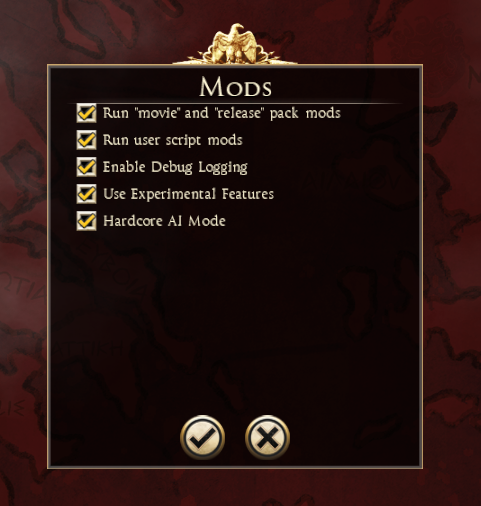
- In your campaign scripts, load the ModSettings framework and read the values:
require ‘modsettings.init’ local is_hardcore = modsettings.core.get("b_hardcore_ai") if is_hardcore then — apply hardcore AI buffs require ‘my_hardcore_feature.lua’ end
The framework is natively configured to hook into consul_logging if that module is loaded. This means the Consul Scriptum mod should be loaded if you wish to see log messages; however, it is not required for any other functionality.
- The DEI Modding Workshop Discord channel and its community.
This mod would not have been possible without:
- https://github.com/taw/etwng
- https://github.com/Cpecific/twwh2_ctm
- Extra information provided by Jake Armitage.
I also created this plugin for editing UI files:
- twuiplug (GitHub)[github.com]
- twuiplug (JetBrains Marketplace)[plugins.jetbrains.com]
You are free to use this framework in your mod without restrictions. We only ask that you include a link to this mod’s Steam page in your description so other modders can find and utilize it.
The code is licensed under the MIT License; see the LICENSE file for details.
The source code for this framework is available on GitHub: https://github.com/bukowa/r2-modsettings

