Priority Master // by @Ony 👾

Priority Master is an advanced modification for the game’s priority system, making it smarter and more efficient. Inspired by RimWorld’s approach, this mod introduces a new layer of strategy to task management and colony optimization. It also prodvide many QoL features!
By default game just choose first task based on number priority ignoring catergory order, this mod will fix this! it also allow to save default priority for tasks type: Build, Dig, Sweep etc and remember last selected by player priority for each task type individually!
All issues should be reported to github: https://github.com/O-n-y/oxy.mods
All news and additional information about mods development are in Discord: https://discord.gg/n9FhwzQFAV

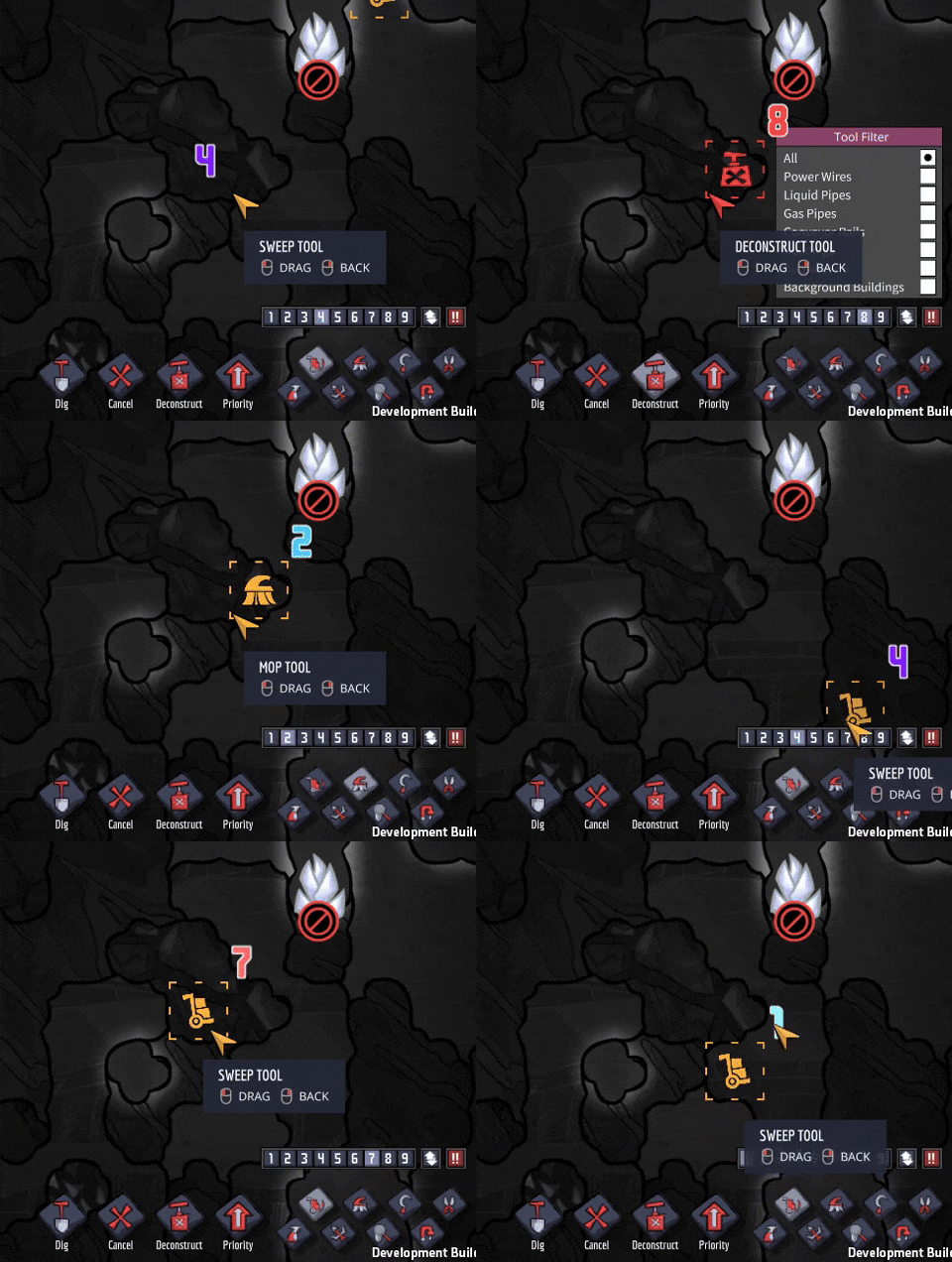

- Dispaly priorities in numbers: as in Rimworld.
- Preview for the priority number: when selected Build, Dig, Harvest, Mop, Deconstruct or Sweep tool you will see a priority number nearby. You will never again use wrong priority number!
- Customizable Default priority: Customize default priority for each type of task: Dig, Build, Sweep, Harvest, Deconstruct and Mop.
- Remember last selected priority: Remember your last selected priority for each task type (Dig, Build, Sweep, Harvest, Deconstruct, Mop) separately.
- Customizable Category Order: Adjust the order of task categories in the mod settings to fit your colony management style.
- Category-based Priority System: For categories of same personal priority, Duplicants will now choose tasks which are first by category order (for example Build and Dig have same personal priority and Build category is going before Dig, so Duplicant will first execute available Build tasks) and after selected the category then will filter those against priority number of the tasks (1-9) like in Rimworld. Can be turn on/off.
- Intelligent Task Selection: Duplicants now choose tasks based on efficiency, opting for the lowest cost option (e.g., closest task) rather than the first in the list.
- Complex task support: The tasks which included multiple tasks for completion, for example construction tasks, which require to supply first and then construct, will be recognized and prioritized properly as part of the main task (in this example – build task).
- Enhanced Task Information: Tooltips now display the task’s category and cost, providing more insight into the priority system.
- Task type: urgent task always goes first – like emergency alarm task
- Duplicant Category Priority: A Duplicant personal priority for a particular category
- Category order (you can change the order): from left to the right – most left are executed first, most right – last (you can change the order in settings)
- Priority number 1-9 for a particular task related to category
In example Gossman have same personal priority for the Build and Dig category, but Build goes first (located to the left), so they will do Build tasks first: supply for construction (as this is part of the build job) and then build an outhouse. And only then it will take tasks to Dig, even the dig jobs have 9 priority and build jobs only 5.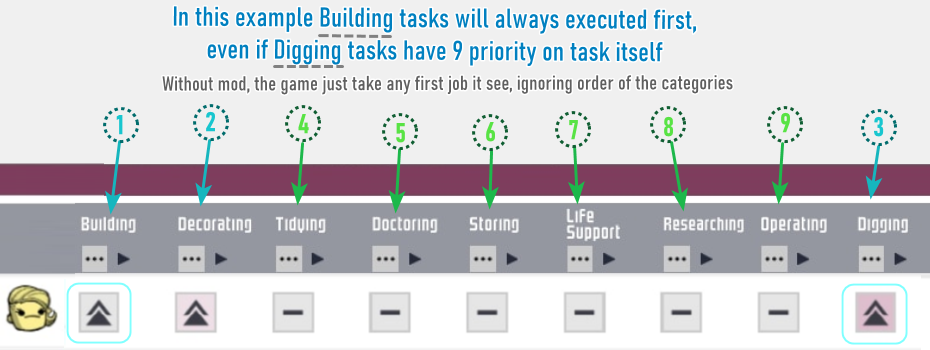
Hightly recommended subscribing to make your life a lot easier!
- Mod Presets Organizer is here to help you! ❤️- Add, edit, export, import mods presets at your need! Whether you’re switching between different playstyles, testing various mods combinations, or simply want to keep your modding setup organized, the Mods Presets Organizer has got you covered. With its intuitive interface and robust features, managing your mods has never been easier!
- Mod Manager – control over your mods, see mods version, auto-updated (even when Steam gives cached version), enable/disable all by one button, mods backups, ability to open a local mod folder (useful when mod have config in files) and much more!
- Debug console (Windows only) –
once activated it will show console window and display all information pushed to console by game or mods, including all errors they have!

Hi! My name is Anna and i am making mods for you guys to have better game experience and more fun for you since 2017 🙂
Love my work? Want to express your appreciation and support further development? Or just want get access to the new mods and updates to help test them out before they released!?
Become a patron!
https://www.patreon.com/ony_mods
- Make sure you activated mod in Mods list in-game and restarted the game.
- Make sure you use the last version of mod, to do so: use my other mod Mod Manager and use Update button in mods list to force update mod via Mod Manager, which will require a game restart (Steam can often give you outdated version, my mod made to solve this).
You can check current actual version number in changelog here:
https://steamcommunity.com/sharedfiles/filedetails/changelog/3333197339
And you can check which version of the mod you exactly have by checking .dll version inside the mod folder: modsSteam3333197339 - If you have game error/crash and have other mods, disable those mods, restart the game (or it won’t take any effect) and try again.
- Clear mods files cache, this should be done not from steam client menu option, but directly via file manager (explorer), in my discord, there is a guide on how to do so https://discordapp.com/channels/611802435220144148/612697981740777494/732211642410205260 (you should join Discord first, link below)
- If you still have an issue, post it in the bug tracker: https://github.com/O-n-y/oxy.mods
- Also, feel free to PM me in Discord https://discord.gg/By2C6RC with any question 🙂
Mod code or part of it not allowed to be modified or/and published under the third-party name, fully or partly. Mod permitted and made to be used only in the existing form in the game Oxygen Not Included for end users.
https://steamcommunity.com/id/oniki/myworkshopfiles/?appid=457140
Join Discord to find out all news about upcomming mods: https://discord.gg/By2C6RC
Check Mod last version number in Changelog: and confirm you have it, before posting any issue https://steamcommunity.com/sharedfiles/filedetails/changelog/3333197339

If you found the mod helpful, rate and favorite, so it will be easier for other players to find it 🙂

