Mako MK II
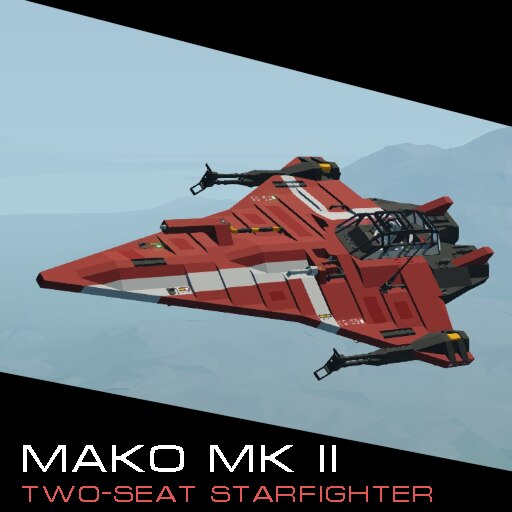
A small, two seater starfighter of my own design, the Mako MKII!
Boasts a top speed of over 600 kph, with nearly 8000 units of fuel, and enough endurance to reach the north pole and return.
Features an altitude hold and roll stabilizer system, if you want to travel long distance with ease.
Landing legs deploy automatically, to save space in the cockpit for other functions.
Autohover automatically kicks in when not in forward flight, to aid in creating an intuitive flight experience.
Unlike my previous starfighter, the Mako MKII can reverse its main propulsion fans!
————————————————-
To FLY!
————————————————-
1: Enter the forward seat, where all flight controls are found.
2: Turn ‘Engines’ Key to ON position, you’ll hear the turbine spooling.
3: Switch the ‘Display’ Button (located bottom right of the forward control panel) to ON. This powers the main displays.
4: When the turbine is sufficiently spooled, the Mako will lift off automatically. You can use the keys 3 (to go up) and 4
(to go down) to adjust the height of the auto-hover.
5: Press the 1 key to activate the main propulsion fans, and accelerate. 2 deactivates the fans, and allows you to slow
to a stop. The stop can be accelerated by pressing 6 (to activate reverse) then tapping the 1 key to allow the
reversed fans to pull the Mako back into a quick stop, or a reverse.
6: Horizontal Altitude Hold is activated and deactivated through the ‘5’ key.
7: To switch between Rockets and Autocannons, flip the switch on the bottom left instrument panel. When in the "ON"
position, the fighter will fire rockets, and when in the "OFF" position, the fighter will fire it’s cannons.
That’s it!
There is an indicator in the cockpit for Altitude Hold, which is triggered by the pilot through use of hotkey ‘5’, and is located under the displays on the left side of the main panel. It will light up green when AH is active.
There are also indicators for reverse, found both on the left arm panel of the cockpit, as well as on the rear of the left exhaust nozzle. Both will light up a white-blue when reverse is active. Reverse is toggled through hotkey ‘6’.
The 4 forward lights are activated through the circuit breaker on the left arm panel of the cockpit, if you are flying using infinite electricity, they will always be on.
There are backup batteries on board, despite the generator present to charge the main batteries during normal operation. Should the craft run completely out of electric power, the rear seat has access to an orange circuit breaker labelled ‘Backup Battery’. Switching this on will connect the additional batteries to the main circuit, allowing the turbine to be restarted, and the main batteries charged again.

