Better Extended Outliner

Better Extended Outliner is an updated and expanded outliner mod for Crusader Kings III 1.19.*.
It combines the expanded outliner features of Extended Outliner with the manual sorting system from Better Outliner, while adding new management tools for armies, holdings, pinned titles, and general outliner workflow.
- English
- Deutsch
- 한국어
- 简体中文
- Русский
- Français
- Español
- Polski

Managing several elective titles can be tedious. Pinned Titles now include direct election tools, so you no longer need to open every title and navigate through the election screen manually.
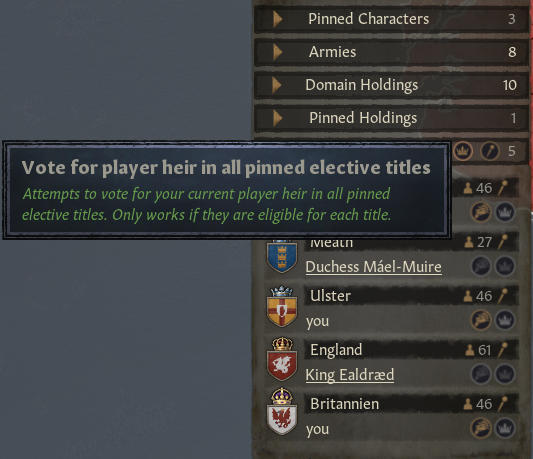
- Show Election – open the election window directly from the outliner
- Vote for Player Heir – nominate your current player heir on a single elective title
- Master Heir Vote – nominate your player heir on all supported pinned elective titles
- Auto-Pin Elective Titles – add all held elective titles where you can vote
- Nomination Warning – highlights titles whose current nomination does not match your player heir
This does not transfer titles or guarantee succession. It only changes your own election nomination where CK3 allows it.

The Army header now includes compact buttons for common army actions.
- Raise Armies
- Army Automation
- Disband All with the normal Vanilla confirmation dialog
Buttons remain visible and are disabled whenever the action is unavailable.
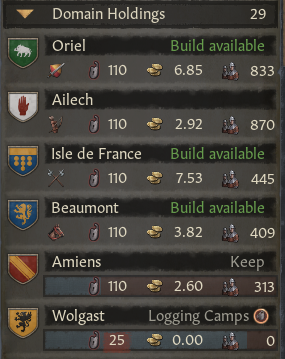
Domain Holdings and Pinned Holdings now provide more useful management information directly in the outliner.
- Build available appears when a holding can construct a new building
- Active construction names remain visible in the same compact slot
- County control is highlighted with a traffic-light system
- Pinned Holdings support the Marshal control quick-action button
- Improved tooltips for holding icons, names, values, and actions
Low control county? Click the Marshal button directly in Domain Holdings or Pinned Holdings.

- Only appears for valid counties
- Hidden at maximum control
- Disabled when the Marshal is already working there
- Confirmation dialog before reassigning tasks
The Army section uses a cleaner and more useful two-line layout.
- Attrition, supply, movement, gathering, embarked, combat, and siege states are easier to read
- Selected armies are easier to recognize
- Sieging armies show clickable siege progress bars
- Expanded outliner for pinned characters, armies, domain holdings, pinned holdings, and pinned titles
- Cleaner and more compact row layouts
- Manual sorting for supported categories
- Direct unpin buttons for pinned categories
- Additional pinned character status information
- Construction names and progress bars in holdings rows
- Improved resync behavior after character switches and succession
- Updated for CK3 1.19.*
This mod is a compatible fork / continuation-style merge based on the two mods below. It is not an official update by the original authors.
This version would not exist without their work.
- Tested with A Game of Thrones
- Recommended load order: A Game of Thrones first, Better Extended Outliner after it
- Other mods that modify the outliner or the same GUI files may conflict
- Test with a new game first
- If something looks wrong, disable other outliner or GUI mods first
Revisions:
Old revisions of this mod are available below. Click the link to download.


