QOL – Equipment window
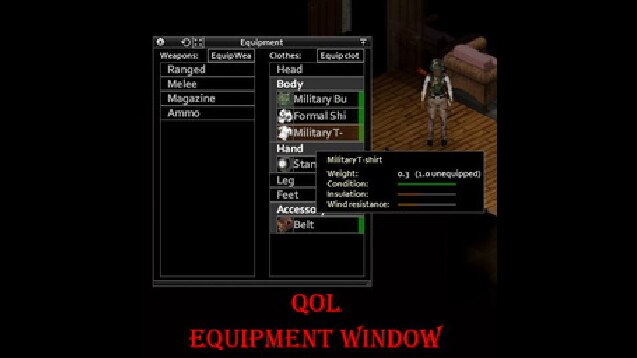
I recommend to unsub and sub back to be sure to get the last version.
Seem like offsets settings make a bug to the resize menu. Maybe just visual, not sure. Try don’t use it for the moment.
Are you tired of:
- Scrolling through the inventory to get your equipment?
- Doing 3 actions to change a single t-shirt?
- Looking item by item to see condition?
- Seek between containers to get clothing, weapons or ammo available?
- Using the inventory for equipment in general ?
If so, use my mod!

Please read all this and all *:
- Work in solo and MP
- Works for existing save
- Work with all mods that add clothes
- Button above the health button
- Custom key bind, default Y *
- Hide equipped items in classic inventory **
- Click on a folder to open it
- Click on an item to display the tooltip
- Double click on an item to unequip
- Shift double click on a cloth to unequip all clothes and put them in the selected container
- Double click on a folder to open them all and shift double click to close them all
- Shift double click on a cloth to unequip all clothes and put them in the selected container
- Right click on an item to get the context menu like in the vanilla inventory
- Bar to see condition, blood and dirt level of clothes and weapons
- Unpin the window to collapse it like the vanilla inventory by clicking on the button on the top right corner (can collapse from bottom, see second gif)
- Equip button to get all available items to equip ***
- Similar control ****
- Choose the size of the window like the vanilla inventory (drag corner)
- Choose sizes of UI elements with the button next to the close one
- Choose some options in the "(mod)" section of the game settings
- Korean, Chinese, Japanese, Spanish and Portuguese translation made by community
* See UI section in key binding in options (Finally a use for the q key?)
** Can be disabled, shift custom key to toogle it.
*** Background of icon tell where is it, green in player inventory, blue in an equip bag and red for other (outside player).
****Double click to equip or add to inventory, use the filter above to filter by name, shift double click to equip and put the clothing that is replaced in the container of the new. Weapon are put in inventory when double click, use the right click to equip to the hotbar. For ammo, double click to add max 10 ammo and shift double click for 50 max. For magazine, double click to add one to inventory.
Folders are customizable! You can add, remove or merge them. For example make only 2 folders, main and secondary. See the customize part.
Thank to GreenfireVerified for the Korean translation !
Thank to MonsterK1llerBR for the Portuguese translation !
Thank to 海人 for the Chinese translation !
Thank to Dydimosfor the Spanish translation !
Thank to hitsub[JP] for the Japanese translation !
Thank to Opex for the Russian translation !
Thank to Kagoule for the help for the French translation !
Snakes Mod Pack, Gourmet Revolution: Can’t hide equip items in inventory
Do not use this version of my mod with the dev version !
Added myself compatibility with scrap armor. Otherwise clothes with custom bodyLocation are put in the folder "Other" but it still work.
If you want to add your custom bodyLocations to a folder go in `media/lua/client/FolderCategory.lua` and add your bodyLocation to the right table.
You can also use it do change the folders (if you want to make a new folder or fuse leg and feet for example)
Full example:
https://steamcommunity.com/sharedfiles/filedetails/?id=2735981362
I do not authorize the use of my code for other mods or modpacks. If you want it, ask it pls.
Workshop ID: 2733680483
Mod ID: QOLET

